


i7 Purge Wiper for Creality
No se pudo cargar la disponibilidad para recoger
Utilice este texto para fomentar la comunicación o promover el intercambio en las redes sociales.
【Creality OEM】100% official, original packaging. Fully compatible with SPARKX I7 and I7 Combo.
【Durable Build】Made of high-temperature resistant POM and stainless steel. Built to last.
【Eco-Friendly Design】Centralized waste collection reduces filament waste and keeps your workspace clean.
【Perfect Fit】Exclusively designed for SPARKX i7, i7 Combo, i7 Autofill, seamlessly integrated with the original filament system.
OEM Fit for SPARKX i7 — Original replacement part engineered exclusively for Creality SPARKX i7, delivering perfect compatibility across all critical operations, including printer preparation, filament loading/unloading, multi-color switching, and the filament purge process.
Efficient Filament Waste Removal — The Purge Wiper is precisely positioned on the far-right side of the SPARKX i7’s X‑axis to effectively flick waste filament away from the hotend, preventing residue buildup and ensuring smooth multi‑color printing workflows.
When to Replace Your Purge Wiper — Visible metal plate wear, bending, scratches, deformation, incomplete waste cleaning before printing, stuck filament residue on the deflector, or Creality support recommendations all indicate it’s time for a replacement.
Durable Metal Construction — Manufactured with a robust metal plate that withstands repeated purging cycles, maintaining reliable waste deflection performance even under intensive multi‑color printing demands.
Quick & tool‑less swap — Designed for straightforward maintenanc using the included H2.0 hex wrench (screws supplied), so you can restore optimal waste management and resume printing with minimal downtime.
i7 Series Purge Wiper Replacement Guide
The Purge Wiper is located at the far-right side of the i7 series printer’s X-axis. Its function is to remove waste filament ejected from the printer, effectively clearing residual strands around the Hotend and ensuring smooth printing operations. This guide explains how to replace the Purge Wiper on i7 series printers.
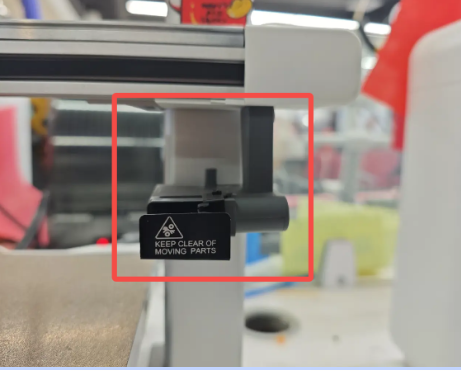
Replacement Timing
This guide applies when the Purge Wiper shows visible damage. Over time, the device may become worn or bent, and its metal plate may be scratched or deformed. Common situations requiring replacement include:
Inadequate cleaning of waste filament before starting a print;
Filament residue attached to the Purge Wiper deflector;
Obvious damage or wear on the Purge Wiper;
Replacement recommended by the Creality after-sales team.
Required Tools
New Purge Wiper (purchase link recommended)
H2.0 Hex Wrench
Safety Preparation
Turn off the printer and unplug the power cable.
Procedure
Using the H2.0 Hex Wrench, remove the two screws located on the right side of the Purge Wiper.
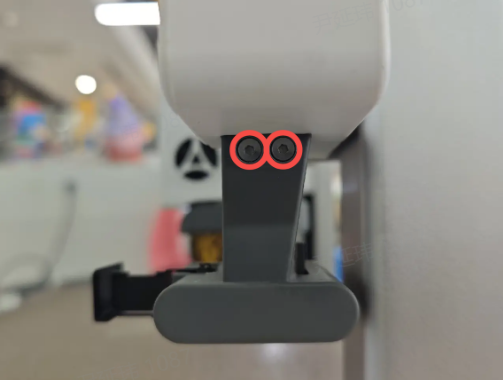
After removing the screws, lift the old Purge Wiper off the bracket following the direction shown in the diagram.

Install the new Purge Wiper onto the bracket, ensuring the correct orientation.

Insert the screws back into their original positions and tighten them securely. If your old screws are lost, replacement screws are included in the accessory kit.
Note: Do not overtighten the screws, as this may cause damage or strip the threads.