


Auto Fire Extinguishing System for Bambu Lab
No se pudo cargar la disponibilidad para recoger
Utilice este texto para fomentar la comunicación o promover el intercambio en las redes sociales.
Fire Safety for Laser Operations.
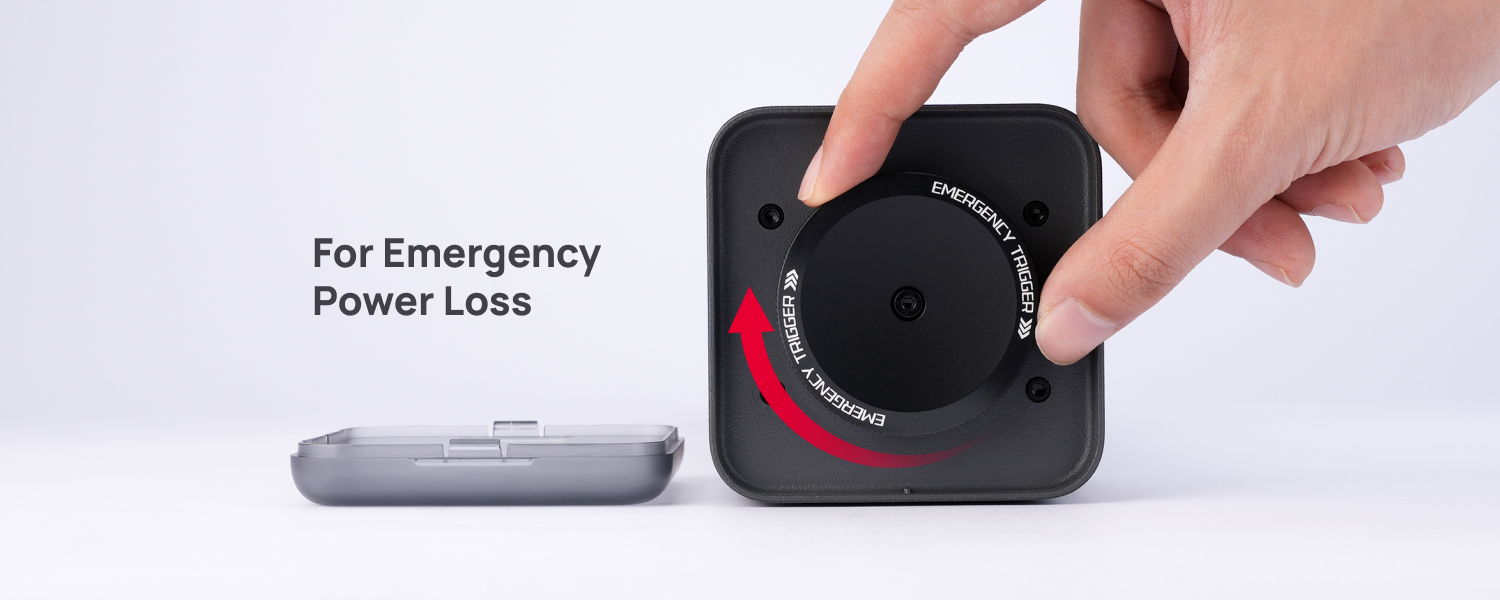
Emergency Manual Trigger for Power Loss.
Adaptive Extinguishing Minimizes Gas Waste.
Important Notice Before Purchase
1. For your safety, it is essential to follow all safety protocols and never leave the printer during a laser job. Please note that the extinguisher does not guarantee 100% success.
2. Compatible Firmware & Software Versions:
- H2D: O1.02.00.00 or later.
- H2D Pro: U1 01.01.00.00 or later.
- H2S: 01.01.00.00 or later.
- H2C: U1 01.01.00.00 or later.
- Bambu Suite: 01.01.01.50 or later.
Compatibility
H2 Series (Laser)

Seamless Integration:
Fully Automated Fire Extinguishing
The Auto Fire Extinguishing System is seamlessly integrated into the H2 series' comprehensive safety behavior logic. It leverages the AI camera and flame sensors embedded in the H2 series machine to detect fire incidents and quickly react by injecting CO2 gas into the chamber, ensuring fully automatic fire suppression.

Manual Safety Mechanism:
Your Backup in a Power Loss
A dedicated manual safety mechanism provides a critical backup. In the event of a power loss, an emergency manual trigger is available to activate the extinguisher, even when there's no electricity to the system.

Frequently Asked Questions
1. What printers is the extinguisher compatible with?
A: The extinguisher is compatible with H2D, H2D Pro, H2S and H2C.
2. What firmware versions of printers and software is the extinguisher compatible with?
- H2D: O1.02.00.00 or later.
- H2D Pro: U1 01.01.00.00 or later.
- H2S: 01.01.00.00 or later.
- H2C: U1 01.01.00.00 or later.
- Bambu Suite: 01.01.01.50 or later.
3. Does the extinguisher guarantee a 100% success rate when a fire happens?
A: Please always remember the extinguisher does not guarantee a 100% success rate in putting out a fire! You should always keep in mind to follow all safety protocols and do not leave the printer while a laser task is in progress!
4. Why do I need to connect the extinguisher to an independent power source?
A: This is to make sure the extinguisher functions during an unexpceted power outage if connected to the same power source as the printer.
5. Can I refill a used gas cylinder?
A: No. The gas cylinder is a one-time consumable. Please purchase a new replacement.
6. What type of gas cylinder works with the extinguisher?
A: The Extinguishing System includes one gas cylinder at the time of purchase. Once the gas cylinder has been used, customers can choose to purchase a replacement from our official store or obtain a compatible cylinder from a third-party supplier. Please make sure the replacement gas cylinder meets the following specifications:
- Thread type: TR21X4
- Volume: 0.6 L
- Diameter: 60 mm
- Length: ≤ 360 mm
- Working pressure: 15 MPa
7. There appears to be some dents on the gas cylinder. Can I still use it?
A: Do not use the gas cylinder if it is damaged in any way as it may compromise its function and cause it to fail to extinguish a fire.
8. If a power outage happens and affect the extinguisher, how do I extinguisher a fire?
A: You can use the emergency handwheel to manually extinguisher the fire. Please note that this method can only be used during a power outage. Do not touch the emergency handwheel in any other circumstances!