


AMS 2 Pro Internal Hub Unit for Bambu Lab
No se pudo cargar la disponibilidad para recoger
Utilice este texto para fomentar la comunicación o promover el intercambio en las redes sociales.
The AMS 2 Pro Internal Hub Unit is specially designed for Bambu AMS 2 Pro, which is located at the rear of AMS 2 Pro and consisits of four Hall sensors, a magnetic rotary encoder, and a motor. It merges four filament slots into one and used to select particular filaments in AMS 2 Pro and convey filaments from AMS 2 Pro to the printer. The Hall sensor detects when the filament reaches a specific position and activates the brushless motor to provide a additional driving force for feeding the filament.
Installation
Learn more about the AMS 2 Pro Internal Hub Unit on Bambu Lab Wiki.
In the Box
- AMS 2 Pro Internal Hub Unit *1
- Extrusion Wheel *1
- M2.5-8 Screw *2
- BT2-11 Screw *3
- 3693ZZ Ball Bearing *1
- Shock-Absorbing Extrusion Silicone *2
Compatibility
AMS 2 Pro
Replace AMS 2 Pro Internal Hub Unit and Internal Hub Motor
This article describes how to replace AMS 2 Pro Filament Hub Unit
Applicable models of printers
AMS 2 Pro
AMS 2 Pro Internal Hub Unit
The AMS 2 Pro internal hub unit is the filament feeding device (4 in and 1 out) . It opens the corresponding feed port according to the currently selected filament position and assists in delivering the filament to the printer. It also has the function of assisting in pulling the printing filament that has been delivered to the printer back to AMS 2 Pro .
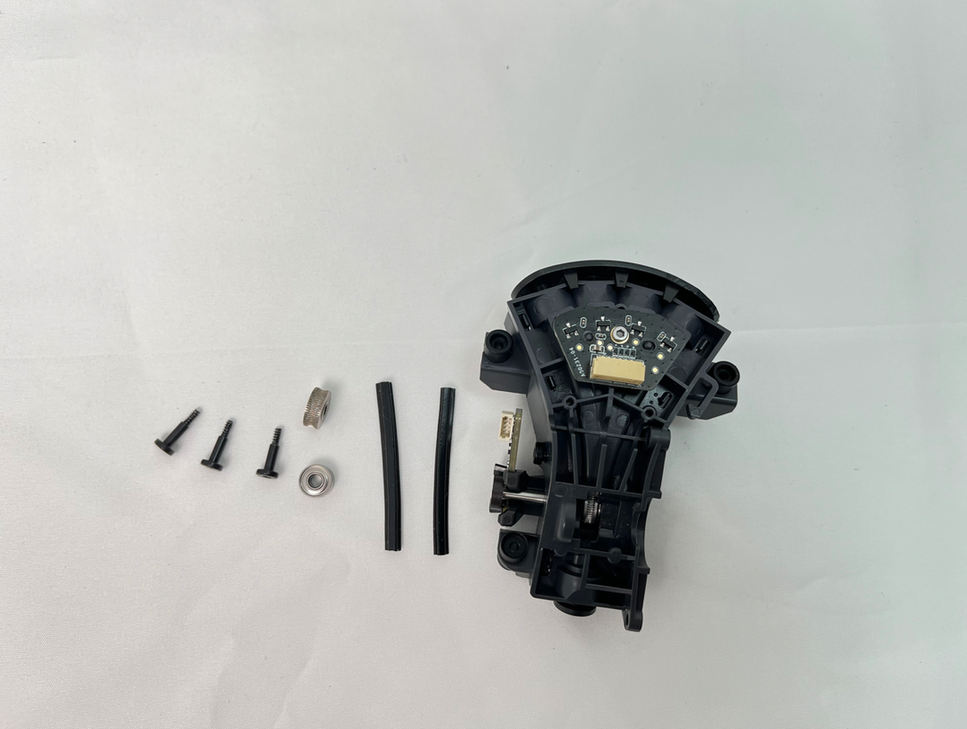
AMS 2 Pro Internal Hub Motor
The AMS 2 Pro Internal Hub Motor is used to power the operation of the AMS 2 Pro
filament hub.
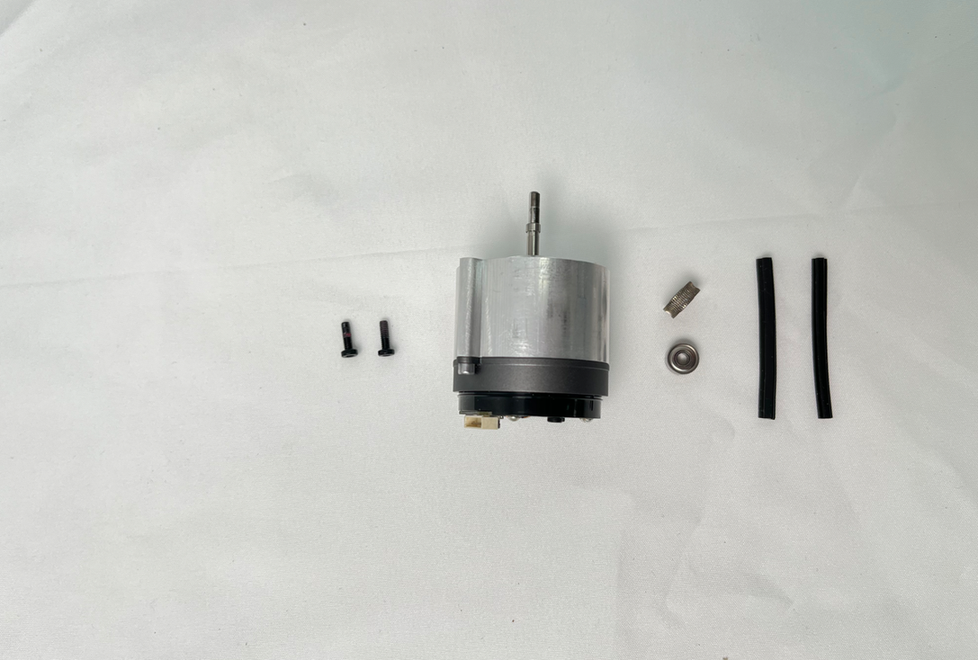
When to use?
All PTFE tubes are checked and connected properly,while filament frequently gets stuck in the AMS 2 Pro filament hub.
After-sales technical support determines that the fault is with the AMS 2 Pro filament hub.
Tools and materials needed
New AMS 2 Pro Internal Hub Unit
H2.0 Allen key
20 minutes
Screws List
Safety Warning
MPORTANT!
It's crucial to power off the printer before conducting any maintenance work, including work on the printer's electronics and tool head wires. Performing tasks with the printer on can result in a short circuit, leading to electronic damage and safety hazards.
During maintenance or troubleshooting, you may need to disassemble parts, including the hotend. This exposes wires and electrical components that could short circuit if they contact each other, other metal, or electronic components while the printer is still on. This can result in damage to the printer's electronics and additional issues.
Therefore, it's crucial to turn off the printer and disconnect it from the power source before conducting any maintenance. This prevents short circuits or damage to the printer's electronics, ensuring safe and effective maintenance.
Before starting, make sure the AMS 2 Pro is disconnected from the printer.
Remove the Internal Hub Unit and Motor
Step 1 - Remove the PTFE tube on the back of the AMS 2 Pro
Press the PTFE tube release button from the back of the AMS 2 Pro to unlock the fitting, then pull the PTFE tube out.
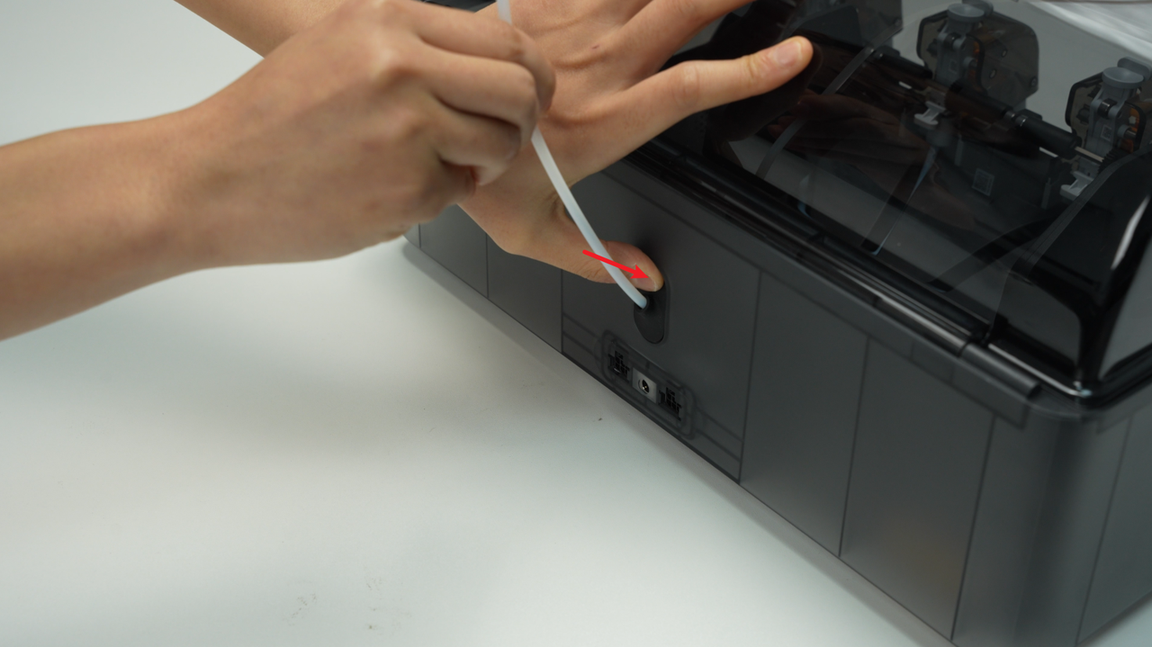
Step 2 - Pull out the PTFE tube release button
Pinch the clip from the inside of the lower cover to automatically pop open the PTFE tube release button, and then pull out the PTFE tube release button from the back of the AMS 2 Pro.

When squeezing the buckle, use your other hand to hold the PTFE tube from the back of the AMS 2 Pro to release the button to prevent the spring from being ejected and lost.
Step 3 - Remove the AMS 2 Pro main frame assembly
Remove the driven support sleeve assembly of the two middle slots to expose the two screw holes. When removing the bearing sleeve, be careful with the bearings at both ends to avoid losing them.
 Remove the two screws that secure the AMS 2 Pro main frame.

Lift the rear part of the main frame completely and place it vertically on the lower cover of the AMS 2 Pro. Note that there are cables connected, so do not operate violently. When lifting, it is recommended to lift the front part of the main frame first, and then push it forward to make room for the rear part of the frame.
When placing the AMS 2 Pro main frame vertically, avoid the electronic components of the vent to prevent them from being crushed.

Unlock the plug buckle, unplug the signal cable and power cable on the AMS 2 Pro power board, and lift out the AMS 2 Pro main frame assembly as a whole.

Step 4 - Disconnect the 4 PTFE tubes
Press the buttons on the quick couplers one by one to unlock the connection and disconnect the 4 PTFE tubes.
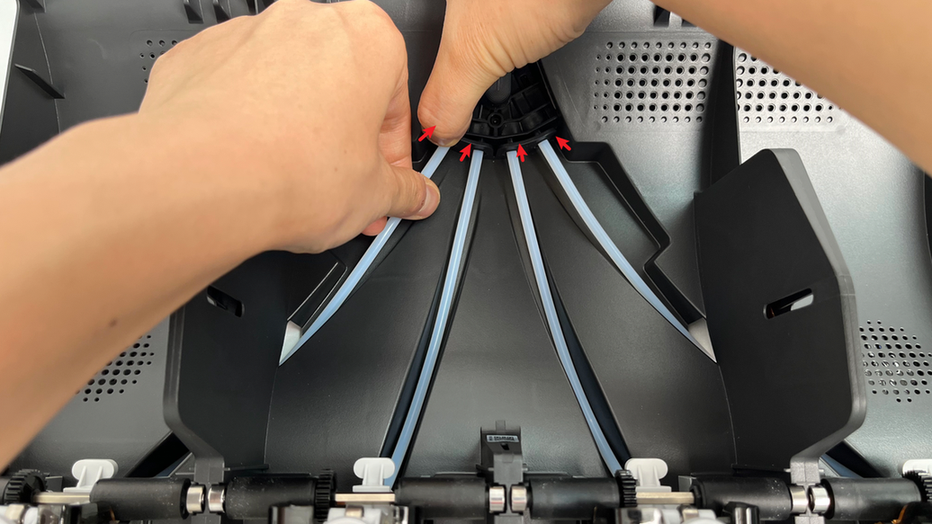
Step 5 - Remove the Internal hub unit
Remove the 3 screws, then pull out the internal hub unit and disconnect the 3 plugs of the motor cable, hall sensor cable, and mileage speed measurement cable.

After removing the filament hub, be sure to store the 2 shock-proof silicone gaskets to prevent loss.

Step 6 - Remove the AMS 2 Pro internal hub motor
Remove the 2 screws and then remove the AMS 2 Pro internal hub motor. When removing the motor, it is recommended to remove the extrusion wheel and bearing together to prevent loss.
When setting the spare parts, we have added the extrusion wheel and bearing to the extruder motor single product and filament hub.

Install the internal hub unit and Motor
Step 1 - Install the AMS 2 Pro internal hub motor
Put the extrusion wheel on the extruder motor in the correct plane direction.

Install the bearing back into the slot of the filament hub, then install the extruder motor back into the filament hub according to the screw holes and screw in 2 screws.
When installing the extruder motor, pay attention to the direction to ensure that the words Bambu Lab and FAM013 can be seen; the direction of the motor plug is facing the mainboard, which means it is installed correctly.

Step 2 - Install the internal hub unit
Install the shock-proof gasket, aligning the groove of the gasket with the edge of the filament hub.

When reinstalling the filament hub, you can use your other hand to push the PTFE tube from the back to facilitate snapping the filament hub into place and aligning it with the screw hole. When installing, pay attention to the shock-proof silicone strips on the filament hub to prevent missing any.
After screwing in the 3 screws, plug in the 3 plugs for the motor cable, Hall cable, and mileage speed measurement cable, and organize the cables.

Step 3 - Connect 4 PTFE tubes
Connect the 4 PTFE tubes to the filament hub one by one.
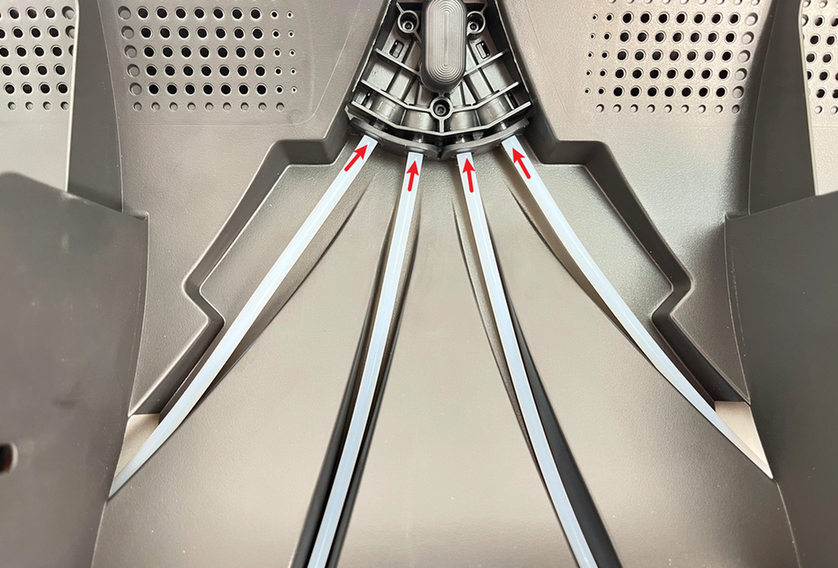
Step 4 - Install the main frame assembly and driven support sleeve assembly
Install the main frame assembly into the AMS 2 Pro lower cover and connect the signal cable and power cable to the AMS 2 Pro power board.

Align the tabs of the bottom cover unit with the slots of the middle frame, and then insert and install.
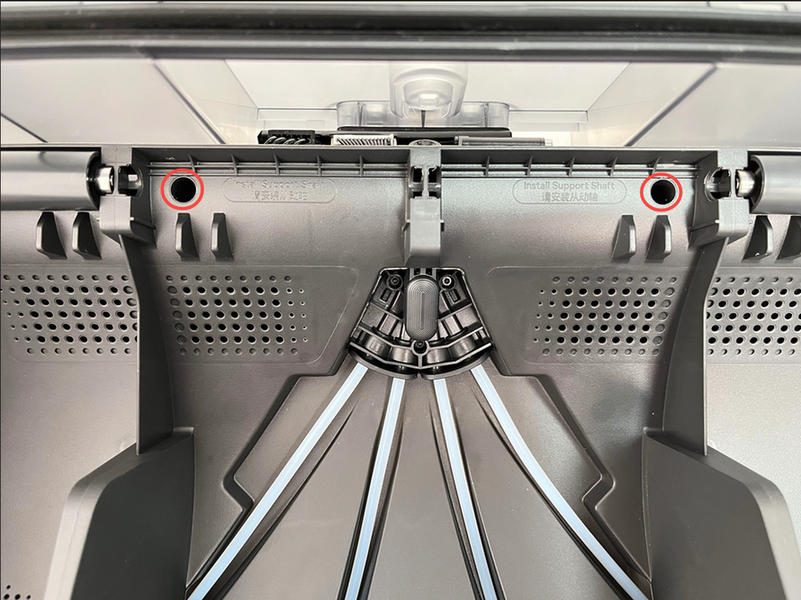
Install the two middle driven support sleeve assemblies, making sure that the bearings on both ends of all support shafts are pressed into place.

Step 5 - Install the PTFE tube release button
Press the PTFE tube release button back into the housing in the following direction, insert the buckle into the corresponding slot smoothly, and keep the black silicone housing embedded flat.

Step 6 - Connect the PTFE tube
Check to make sure that the PTFE tube silicone bracket is aligned with the filament hole of the internal hub unit, and push the PTFE tube from the rear of the AMS 2 Pro. After installation, pull the PTFE tube to confirm that the PTFE tube is fixed.

Calibration
Connect the power cable, connect the AMS to the printer, turn on the power, and start using the AMS 2 Pro to load filaments through the operation on the screen. If the loading can be completed and no error prompts appear during the entire loading process, the replacement is successful.
Otherwise, please check all connections and try again. If the problem persists, please contact Bambu Lab service team for further assistance.